Carnegie Mellon · Concept · 2025
Spotify Smart Sound: better audio for anyone, anywhere
People kept telling me Apple Music sounds better than Spotify. Spotify's equalizer is buried in settings and labeled in hertz, so most people never use it, and sound quality is one of the reasons people give for switching services. I interviewed four very different listeners, from an audio engineer to a casual listener, checked what they said against research on codecs and loudness, sketched the recommendation model in Python, and designed Smart Sound. It picks a profile for your device and setting, tells you what it changed, and lets you adjust it with Warmth, Clarity and Bass.
The problem
People blame the app for how their music sounds
The project started with something people told me: Apple Music sounds better than Spotify. When I asked about Spotify's audio settings, they knew the settings existed but found them limited and too technical, so they left them alone.
That matters to Spotify because sound quality is one of the reasons people give for switching services. If audio sounded right without anyone touching an equalizer, that reason would go away.
What would better audio look like if it felt approachable and personal for every listener?
Research
Listeners describe sound by how it feels
After a screener survey, I interviewed an audiophile, an audio engineer, a casual listener who sings and self-produces, and a classically trained musician. Then I checked the patterns against desk research on how streaming services process audio.
Nobody uses the equalizer
Everyone knew the controls existed. Labels like "250 Hz" didn't match how they think about music, so they left them alone.
Quality feels inconsistent
The same song sounded different on headphones, car speakers and in different rooms, and people didn't know why.
Trust shapes what people hear
Apple Music sounded "fuller" and "clearer" to them. Services do use different codecs and loudness targets, but labels like "Lossless" did much of the convincing.
The pivot
Critique changed what "better audio" meant
I brought three directions to critique: audio that adapts to your device, playback that predicts and prevents problems, and personal audio profiles. One comment from a classmate changed my direction.
Rather than changing the sound, Spotify could give light-touch guidance that helps listeners understand how their device or environment shapes what they hear.
Vivian L., peer critique
I had been designing a system that quietly processes everything. Audio that changes without saying so would be hard to trust, so I moved toward a version that explains itself.
Adapt automatically, say what changed, and let people take over in an Audio Studio.
The solution
Smart Sound and the Audio Studio
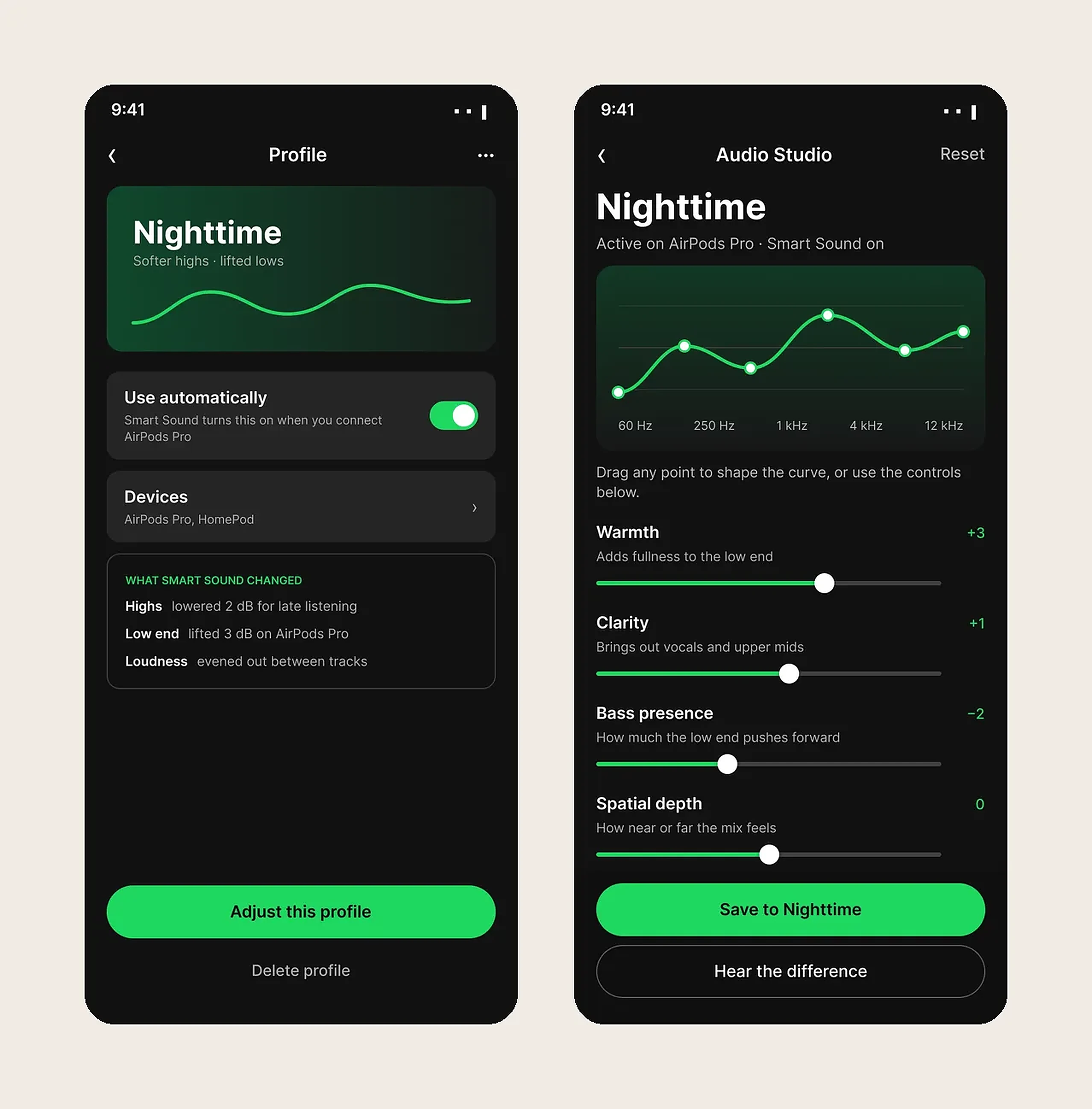
Smart Sound picks a profile when playback starts, and the player shows which one is on and why, for example "Nighttime, on AirPods Pro." One tap turns it off or switches profiles. In the Audio Studio, the frequency sliders are gone. People adjust Warmth, Clarity, Bass presence and Spatial depth, words closer to how they already describe sound.
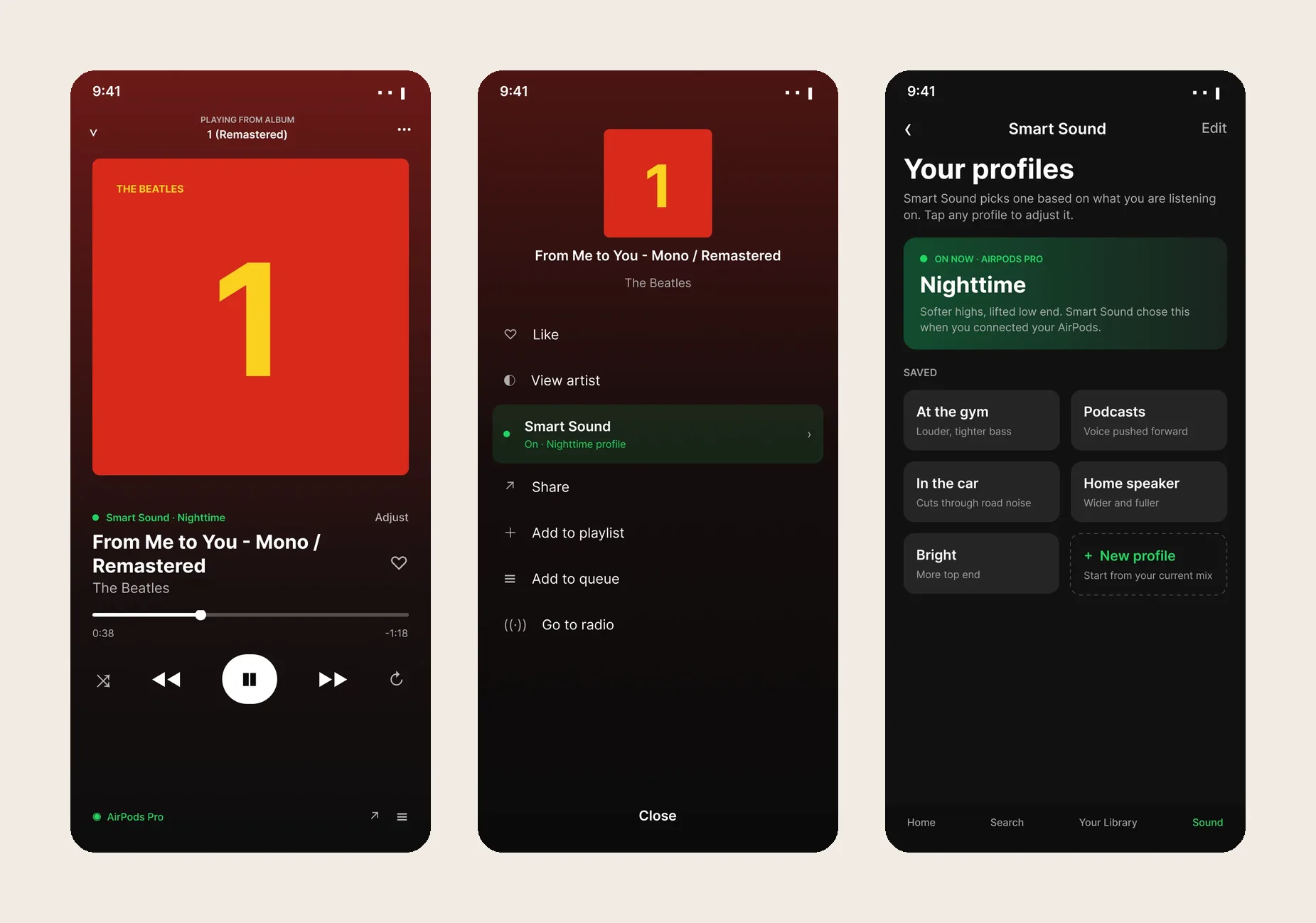
Behind the interface, the app would log the device, environment signals, track features and past profile choices each time playback starts. A model trained offline predicts which profile people prefer in similar situations, and the interface applies it while letting listeners see and override it. I wrote a Python sketch of this logic so the design wouldn't promise more than the data could support.
In testing, the feature felt bolted on, so I moved the toggle and profiles into menus people already use. Testers didn't understand the profile icons, so I replaced them with simpler ones.
Key decisions
- 01
Make the feature explain itself
My first design processed audio quietly in the background, which is the simplest experience if it works. In critique, I realized audio that changes without saying so is hard to trust, and people already blamed Spotify for how their music sounded. Smart Sound now says which profile is on and why, and one tap undoes it. That adds a line of interface to the player, and I think it's the line that keeps people from turning the feature off.
- 02
Replace hertz with words people use
Hertz sliders are precise, which suits audio engineers. Everyone else described sound by how it feels and left the equalizer alone. I used Warmth, Clarity, Bass presence and Spatial depth instead. Experts lose some precision, and the people who never touched the equalizer get controls they understand.
- 03
Prototype the model in Python
I could have designed the interface and assumed the recommendations would work. I sketched the logic in Python first, so the design wouldn't promise more than the data could support. It slowed the design down, and it kept me from showing suggestions the model couldn't make.
Reflection
What I learned
Explaining the change earns trust
Listeners won't keep audio that changes without telling them. Showing what changed, with one tap to undo it, is what would make people leave Smart Sound on.
Next: prove the difference
Four interviews set the direction but can't prove people hear a difference. Before building, I'd run a blind listening test across devices and track how often people keep or override the suggested profile.